What's New
New:
To-Do Improvements
Working hard to make Break Diving truly the best place to fuel your dreams, get things done, and make friends with like-minded people!
Comments and replies (1)
Here are a few improvements to task creation, management, and completion:
- Clear task categories and yellow highlighting show exactly what to work on.
- Finished tasks move into a compact green completion icon and count.
- Every repeating task needs two checks to finish a full rotation.
- Unfinished checks carry into next week; completed weekly tasks restart Monday without losing rotation credit.
- Finish a rotation to see a celebration and your last-completion date.
- Completion confirmations help prevent accidental checkoffs.
Working hard to make Break Diving truly the best place to fuel your dreams, get things done, and make friends with like-minded people!
New:
Our Ten-Step Plan On How To Use New ToDo List Features
OUR TO-DO LIST QUICK START
1. Log in on desktop
2. Click on green launch control in nav bar
3. Scroll down and make sure you have at least 1 dive in pursuit in the dives section
4. Now move to the todo list section on Launch Control
5. Find one of your dives in pursuit, and create a 'personal todo' item for that dive at that level.
6. Then add some general and personal todo items as well, in that same section, under the 'general' and 'life' lists.
7. Add two more new todo items, but this time, create them as simple repeating tasks you want to do once or twice a week, like "Study Chinese" or "Wash car" or "Do laundry" or "Go to gym". Before you add the item, click the 'add to task pool' checkbox
8. Go back to homepage, and look at the top to see the 6 mission cards. See the two on the left? Cool right?
9. Now, look below, at the next row of cards, and at the two in the middle. Cool right?
10. Now start playing around with the different buttons on the various task cards, and... GET TO WORK!
BONUS: Leave comments and reactions on others' todo list items, to root them on or congratulate them! Look at the global feed / global ticker to see member todo items scroll on by, and give them some support! Other members will then do the same for you.
Note, this is just a taste, to get you moving in the right direction. There are many more features already released, so play around and you'll find them. And we are constantly be working to improve the UI to make everything easier and more intuitive to use. Mobile web currently works the same, but is going to have more bugs. We have not yet updated the iOS or Android mobile apps---please standby!
Upcoming ToDo Features:
1. Re-order your lists.
2. Print your to-do lists, and/or print particular items from your todo lists.
3. Receive email and text reminders about tasks that are particularly important to you.
4. Receive reminders about pending dives of interest, dives in pursuit, and certified dives.
5. Share your to-do lists and/or items with others, in the community, and outside the community.
7. Create 'projects' in which you can put various lists.
8. Private to-do items (for paid members).
Remember: If you want unlimited tasks, subtasks, private tasks, etc. please upgrade to a paid plan! It's worth it, and helps us to pay for the costs of the expenses that keep us pushing forward (which right now are the AI credits to help us with the coding, and advertising costs).
NOTE: You can always find these instructions in the news section. We also now have a bookmark feature throughout the site, so anything you want to save, just click the bookmark icon in top right. Even on this post! Or on any comments. Find your full list of bookmarks in your name dropdown.
Comments and replies (0)
1. Log in on desktop
2. Click on green launch control in nav bar
3. Scroll down and make sure you have at least 1 dive in pursuit in the dives section
4. Now move to the todo list section on Launch Control
5. Find one of your dives in pursuit, and create a 'personal todo' item for that dive at that level.
6. Then add some general and personal todo items as well, in that same section, under the 'general' and 'life' lists.
7. Add two more new todo items, but this time, create them as simple repeating tasks you want to do once or twice a week, like "Study Chinese" or "Wash car" or "Do laundry" or "Go to gym". Before you add the item, click the 'add to task pool' checkbox
8. Go back to homepage, and look at the top to see the 6 mission cards. See the two on the left? Cool right?
9. Now, look below, at the next row of cards, and at the two in the middle. Cool right?
10. Now start playing around with the different buttons on the various task cards, and... GET TO WORK!
BONUS: Leave comments and reactions on others' todo list items, to root them on or congratulate them! Look at the global feed / global ticker to see member todo items scroll on by, and give them some support! Other members will then do the same for you.
Note, this is just a taste, to get you moving in the right direction. There are many more features already released, so play around and you'll find them. And we are constantly be working to improve the UI to make everything easier and more intuitive to use. Mobile web currently works the same, but is going to have more bugs. We have not yet updated the iOS or Android mobile apps---please standby!
Upcoming ToDo Features:
1. Re-order your lists.
2. Print your to-do lists, and/or print particular items from your todo lists.
3. Receive email and text reminders about tasks that are particularly important to you.
4. Receive reminders about pending dives of interest, dives in pursuit, and certified dives.
5. Share your to-do lists and/or items with others, in the community, and outside the community.
7. Create 'projects' in which you can put various lists.
8. Private to-do items (for paid members).
Remember: If you want unlimited tasks, subtasks, private tasks, etc. please upgrade to a paid plan! It's worth it, and helps us to pay for the costs of the expenses that keep us pushing forward (which right now are the AI credits to help us with the coding, and advertising costs).
NOTE: You can always find these instructions in the news section. We also now have a bookmark feature throughout the site, so anything you want to save, just click the bookmark icon in top right. Even on this post! Or on any comments. Find your full list of bookmarks in your name dropdown.
New:
Updated Homepage, Mobile Web, and Emails
✉️ Email delivery
🛠️ Behind the scenes (#2898)
IMPORTANT NOTE: We know things are a bit confusing now. And it may be for a short while longer. We are adding many exciting brand new features and at the same time, trying to redesign the homepage to make it easy, efficient, and logical for you to be able to know what to do, and to find what you need. It's not an easy task. To that end, we are constantly experimenting, and hope to have this all figured out over the next month or so. In the meantime, thank you for your patience. If you have any suggestions, please share in the comments below.
🏠 Homepage & Community Missions
- Today's Community Missions are the most important things you should see every time you log in. If you finish your missions, you will have both propelled your own life forward, and also have propelled your fellow Break Divers' lives forward. So it now sits in one compact strip at the top of your home page. Tap the ▾ on any card for details. The DONE! stamps and celebrations are still there after you complete a mission. The two cards on the left remain pinned IF they are pinned in the control cards below.
- The Go! button now lights up once you've starred three missions.
- New banners: Three Missions Done! at three, Six Missions Done! at six. Click the Six Missions banner to be asked "Want six more?" again. "Not now" is no longer final.
- Today's Main Task now follows your task list: your pinned task, or the top one. It updates when you refresh or pin.
- Today's Bonus Task is now the same habit as the Bonus row on your Weekly Streak card. Refresh one and the other follows.
- No dives or to-dos yet? The card now offers New Dive and New To-Do buttons.
- Community Events moved to the top of the right column, showing four events with an expand button for the full list.
- The Global Feed and ticker no longer stall in long sessions, and signing back in takes you to the homepage.
📱 Mobile (Web)
- A new rocket icon opens quick actions. The notifications bell opens a floating panel.
- Both mobile menus are now compact, touch-friendly grids that fit on one screen without scrolling.
- The bottom bar swaps "Dash" for Tasks, and the + button sits above it.
- Smaller S / M / F ticker speed pills, and the pause/play button now works properly.
- Fixed sideways scrolling and overflow on profiles, chatrooms and member search.
📱 Mobile (App)
- We have begun to start updating the mobile app features to match what is now available on web. Estimated completion: end of December/early January.
✉️ Email delivery
- Newsletter and system emails are now tracked separately, so we can spot delivery problems sooner.
- Addresses that permanently bounce or report spam are automatically paused, which protects delivery for everyone.
- Staff get a new email-health dashboard.
🛠️ Behind the scenes (#2898)
- Admin pages (subscribers, users, mission library) load much faster, with far fewer database queries.
New:
Huge Wave of Homepage, Streaks, & Feed Upgrades!
🚀 Hey Break Divers! We’ve just rolled out an exciting batch of improvements across the entire platform. Here is everything fresh and new:
🔥 Weekly Streaks & Habit Tracking Upgrades
🔥 Weekly Streaks & Habit Tracking Upgrades
- Live Streak Milestones: When you reach your weekly points goal, your streak count now increments immediately (e.g. jumping straight to 2 weeks instead of making you wait until next Monday)!
- Goal Stretching Status: When you achieve Steady (Bronze) and choose to stretch for Ambitious (Silver) or Unstoppable (Gold), your streak card and details modal now clearly cheer you on with: "Steady reached — going for Ambitious!" (or Silver to Gold).
- Streak Protection: Reaching your chosen goal locks in your streak count for the week—pushing for a higher level is a bonus that never risks your earned streak!
🎯 Daily Community Missions
- Automatic Midnight Reset: Fixed an issue where the mission cards could stay stamped from the previous day. A new day turnover detector and timer guarantee that your 6 community mission suggestions refresh clean at midnight with a brand-new daily deck!
📋 Homepage Tasks ("Make Mama Proud!") & Motivation
- Smooth Completion Animations: Checking off a task now strikes through the text and smoothly slides it off the card, while the new replacement task slides in from the right.
- "NEXT!" Visual Guidance: Clicking the "NEXT!" button on your task completion banner now triggers a staggered pop-up with a warm yellow glow across your next three tasks, guiding your eye to what you can tackle next!
- Gentle Task & Goal Nudges: To keep you moving forward and prevent banner blindness, a subtle periodic wiggle with a warm yellow highlight rotates through your open tasks, Daily Motivation (if today’s 60s goal is still open), and unfinished community missions.
- No More Button Flicker: Fixed an annoying tooltip text flicker when moving the mouse across buttons and icons on the homepage.
🌐 Global Feed & Ticker Tape
- Centered Spotlight & Confetti Fanfare: When you complete a task or certification, your new card glides into the stream, smoothly centers itself in the middle of the feed and ticker, pauses, and fires celebratory confetti fanfare so the community can celebrate your win!
- Ticker Horizontal Click-and-Drag: You can now click, hold, and drag the site-wide ticker tape left and right with your mouse to browse past and upcoming activity at your own pace!
- Flush Alignment: The "LIVE" badge on the ticker is now 62px wide and perfectly centered, sitting completely flush with the top of the left action menu rail.
- Crystal-Clear Action Badges: Feed items now clearly show what happened (TASK COMPLETED, DIVE CERTIFIED, NEW TASK, NEW DIVE, NEW POST, NEW WYSEGUIDANCE, NEW BLOG POST), with a bright companion FRESH tag for the first 30 minutes.
- Smarter Feed Queueing: Community news announcements and your own new activity are queued cleanly into the stream without wiping the feed, jumping to the top, or repeating news back-to-back.
👤 Profile "To-Do Lists" 3-Column Redesign
- 3-Column Layout: The profile To-Do tab has been redesigned from a single cramped column into 3 balanced columns utilizing the full width of the screen:
- Dives To-Do (Ocean Blue)
- General To-Do (Slate Gray)
- Life To-Do (Magenta / Pink)
- Matching the exact colors, icons, and categories from Launch Control!
💓 Community Pulse
- Dedicated Pulse Speed Controls: The Community Pulse facts reel on the homepage now has its own Slow / Med / Fast speed buttons, remembered on your account and browser.
- Refined Fact Timing & Text: Improved the text phrasing, cardiogram rhythms, and spacing for community milestones on /pulse.
🌟 Platform Polish & Media
- Homepage Media & Story: Added Monroe’s TEDx talks and Epoch Times feature to the homepage story and media section.
- Feature Updates Page: Updates on the feature board now display newest-first so you can always see the newest platform additions right at the top.
- Annual Renewal Transparency: Added 14-day advance renewal reminder notices for annual members to keep billing transparent and friendly, backed by an admin subscriber dashboard.
And... many more coming in the next few days! :D
New:
More Features & Fixes!
Task pages
Conversations and notifications
Latest comments
Global Feed
- Community News leads the feed, so new announcements show up first.
- When you post, create a task or finish one, you see it once with a "Live on the community feed!" banner, so you know the community can see it.
- Quiet weeks are filled with real activity from the last 30 days instead of old unanswered posts.
- Task cards say "new task" or "task done" and show which list or dive they belong to.
- Comment cards name the post or task they're about.
- MOST INSPIRING, MOST EDUCATIONAL, MOST MOTIVATIONAL, MOST FUNNY and MOST HELPFUL cards point to the post with the most of that reaction this week, this month or this year.
Task pages
- Every public task has its own page with its details and one conversation. You can cheer, comment and reply there.
- Your profile's To Do Lists tab lists your tasks, open ones first.
- Public tasks appear on the feed and your profile. Private tasks stay out of the feed, and only you see them. Private tasks are a premium feature, and free members can have up to 20 tasks total.
Conversations and notifications
- You can react to Community News, task comments and task replies.
- The bell tells you about comments on your things and replies to your comments. Reactions no longer ping you
Latest comments
- Rest your mouse on a card, or tap its comment button on a phone, to read the latest three comments or replies.
- "See 4 more" opens the full discussion: the task's page for a task, or the post for a post.
- Keyboard users can tab to the comment button to open the latest comments.
- Task headlines in the feed and ticker open the task's page.
More good stuff coming soon!
If you haven't already, go to launch control, and start adding todo list items! Create a few as repeating tasks as well.
New:
Global Feed is LIVE
After 7+ years, my dream of having a global feed here on Break Diving has finally come true. You will see it on homepage widget, and also when you scroll down, and on every other page in the community.
We still have work to do on the algorithm, to ensure it's sharing the most relevant activity, but the hardest part is DONE. And live. And over this week, we will be experimenting with different algorithms to see what is displayed.
This is a huge day for Break Diving, and I hope you love this new feed as much as I do! Let's now see if it helps to increase activity here in our community!
-Monroe
Comments and replies (0)
We still have work to do on the algorithm, to ensure it's sharing the most relevant activity, but the hardest part is DONE. And live. And over this week, we will be experimenting with different algorithms to see what is displayed.
This is a huge day for Break Diving, and I hope you love this new feed as much as I do! Let's now see if it helps to increase activity here in our community!
-Monroe
New:
And another feature update!
Next Up: GLOBAL FEED (This is super cool)
Then: COMMUNITY LEADERSHIP ROLES (This is slightly less cool, but cool nonetheless).
Comments and replies (0)
- Today's Rotating Task: At the bottom of your Task Streak Pool, you'll now see a dedicated Today's Rotating Task with a checkbox, a refresh button (↻), and a countdown showing how many habits remain in your current round.
- Your streak habits are shuffled into a fair, randomized round sequence.
- Tap ↻ at any time to cycle through your remaining habits without repeating any.
- Checking off today's habit automatically checks off a box in your Weekly Streak card, awards your streak points, and marks off your daily quest!
- Once you complete every habit in your pool, it automatically shuffles into a fresh new round!
TRANSLATION: If there are things you want to repeatedly do, and there's no deadline, just check today's rotating task, do it, and it goes to the next. It is populated from every task in your streak pool.
- Two Personal Goal Cards in Community Missions: Your daily Community Missions deck now features two cards dedicated specifically to your personal goals:
- Card 1 (Today's Rotating Task): Directly mirrors your active rotating habit from your Task Streak Pool.
- Card 2 (Your Personal Next Step): Shows your pinned next step from your To-Do list (or an open goal from your list) with the prompt: "Finish this task or take a serious step forward towards it."
- Checking off your personal next steps and habits stamps your cards and helps you achieve your daily 3-quest goal and 6-quest daily bonus!
- "Shuffle Quests" Button: Don't feel like tackling a specific community challenge today? Click the new ↻ Shuffle Quests button on your missions board at any time to swap out unfinished community cards for fresh alternatives from the library. Your personal to-do cards, already-completed quests, and starred Daily Focus goals stay firmly anchored in place.
- Event Hosts & Co-Hosts Spotlight:
- Event pages now feature the event's Hosts and Co-Hosts right below the date and time, complete with direct links to each host's public Break Diving accomplishments profile!
- Event organizers are automatically registered for the event.
- Dedicated community points for hosting, co-hosting, and attending are officially awarded after the event concludes and attendance is checked in.
- Private Message Conversation Starters:
- Reaching out to another Break Diver (even if you do not know that member) is now effortless and fun! How? When you open a new private message, you'll find 3 clickable Conversation Starter prompts tailored to that member's profile—referencing the dives they are pursuing, languages they speak or study, their hometown, or recent wins from their Success Journal. Click any starter to instantly insert it into your message to get the conversation going!
- Reaching out to another Break Diver (even if you do not know that member) is now effortless and fun! How? When you open a new private message, you'll find 3 clickable Conversation Starter prompts tailored to that member's profile—referencing the dives they are pursuing, languages they speak or study, their hometown, or recent wins from their Success Journal. Click any starter to instantly insert it into your message to get the conversation going!
- Richer Quest Library: Additional mission activities and reward rules have been added across the platform to make daily participation and community connection more varied, motivating, and fun!
Next Up: GLOBAL FEED (This is super cool)
Then: COMMUNITY LEADERSHIP ROLES (This is slightly less cool, but cool nonetheless).
New:
More Features & Fixes!
FEATURES/BUG FIXES:
1. CHATROOM MESSAGES: No more lost messages in the chatrooms! First, anything you write gets saved as you type. Even if you refresh page, it will still be there until you submit. Second, it will tell you when the draft is saved. Third, it will post IMMEDIATELY, fixing the problem of the chat message taking 3, 5, or 10 seconds to post. We will have to keep an eye on this, but it should now be fixed. Huzzah!
2. RANDOM BUG FIXES: Fixed some random bug to make everyone's experience better and more smooth.
COMING SOON:
1. HOMEPAGE PERSONALIZATION: In the pipeline are three home-page templates. So if you prefer to-dos at top, that's what you get. If you prefer chatroom and message board at top, that's what you get. If you prefer dive progress and launch control at top, that's what you get. So depending on if you are a doer, a socialite, or a lifelong learner, you can make Break Diving your own. You will still have access to everything, but by clicking a button, you can change the layout. Based on feedback from a bunch of people, I think this may be a good idea, so that members aren't forced to embrace a work flow and user interface that they don't love. And allowing members to change their focus whenever they want.
2. GLOBAL FEED: It's almost done, and will be launched either today, or tomorrow. This is the final piece of the main puzzle, and should help to make everything else on the homepage make a lot more sense. Standby! Coming soon!
-Monroe
Comments and replies (0)
FEATURES/BUG FIXES:
1. CHATROOM MESSAGES: No more lost messages in the chatrooms! First, anything you write gets saved as you type. Even if you refresh page, it will still be there until you submit. Second, it will tell you when the draft is saved. Third, it will post IMMEDIATELY, fixing the problem of the chat message taking 3, 5, or 10 seconds to post. We will have to keep an eye on this, but it should now be fixed. Huzzah!
2. RANDOM BUG FIXES: Fixed some random bug to make everyone's experience better and more smooth.
COMING SOON:
1. HOMEPAGE PERSONALIZATION: In the pipeline are three home-page templates. So if you prefer to-dos at top, that's what you get. If you prefer chatroom and message board at top, that's what you get. If you prefer dive progress and launch control at top, that's what you get. So depending on if you are a doer, a socialite, or a lifelong learner, you can make Break Diving your own. You will still have access to everything, but by clicking a button, you can change the layout. Based on feedback from a bunch of people, I think this may be a good idea, so that members aren't forced to embrace a work flow and user interface that they don't love. And allowing members to change their focus whenever they want.
2. GLOBAL FEED: It's almost done, and will be launched either today, or tomorrow. This is the final piece of the main puzzle, and should help to make everything else on the homepage make a lot more sense. Standby! Coming soon!
-Monroe
New:
More New Features!
For members
COMING NEXT
For admins
- New "Email Templates" page in the admin sidebar (envelope icon, full admins only).
- Edit the subject and body of 20 automatic emails: welcome, birthday, event reminder, the four application emails, and one for every dive-certification and blog-post status.
- Preview an email in the browser, send yourself a test, or restore the default wording at any time.
- Placeholders like {{first_name}} fill in automatically. Misspelled ones are rejected when you save, so a broken token never reaches a member.
- The accepted-application and needs-revision emails must keep their personal links ({{registration_link}} and {{edit_link}}), so applicants can always act on them.
- Sidebar icons: Mission Library, Contextual Help and Email Templates now have icons like the other menu items.
- "What needs fixing?" box on the dive-certification and blog-post edit forms. Whatever you type there goes to the member when you choose "Needs Member Attention."
For members
- Status emails: every time staff changes the status of your dive certification or blog post, you get an email about it.
- Attention messages: for "Needs Member Attention," you also get a private message from the staff member who made the change, with exactly what to fix.
- Welcome email: new members get one friendly welcome shortly after joining. It uses updated wording, including the Community Motto.
- Birthday email: members with a real birthday on their profile get a greeting once a year, using Victor's original letter. Members who never set a birthday are not emailed.
- The dive-upgrade safeguard
- Upgrade is grayed out until the member has a Live WYSEguidance for that dive at the next level. A red notice explains why.
- The server enforces it too, so nobody can be upgraded early by any other route.
- Live prompt: when a full admin sets a WYSEguidance to Live, the page asks "Upgrade this dive now?" If yes, it jumps to that member's admin page with the right Upgrade button flashing.
- Congratulations timing: the "your dive is Live" email is sent only after you click Upgrade, so it always means the member is officially certified.
- Reliability
- No double sends: welcome, birthday and congratulations emails are each sent at most once.
- Recovery after failures: if sending fails, the email is retried automatically and not lost. A hiccup also never blocks a signup or a status update.
- Scheduling: the jobs that send these emails are scheduled on both of the site's job systems, so they run in production either way.
COMING NEXT
- Global Community Feed
- Community Pulse
- Who is Waiting for You
- Accountability Group program
- And much much more!
New:
Weekly Streaks!
Hi All!
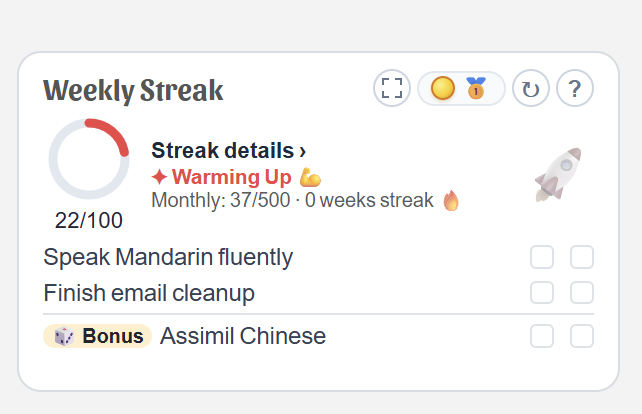
Weekly Streaks are finally here. Here's a quick tutorial:
1. On homepage, the third card is now active.
2. Click the ? on the card to get more in depth instructions
3.The 'chasing arrow' refreshes the unpinned tasks
4. The medal/energy button opens up the control center for weekly streaks. You can choose Bronze, Silver, or Gold. You can upgrade or downgrade at any time during the week, month, or quarter.
5. The streak meter (the circle) shows your points towards your weekly streak. You earn points by doing things around the community. Right now, the 'bronze' level is 25 points per week.
6. You can choose tasks from your todo list to add to your 'streak pool'. When you create new tasks, you can also add them to your streak pool. Of those tasks, you can choose 2 as priority tasks for the week (the top two lines), and then pick 3 supporting streak tasks (which get rotated on the bonus line at bottom).
We are just getting this going, so as we use it, it may need some refinement to make sure it works correctly, and is easy and intuitive to use.
We're just getting started everyone! Next stop: Global Feed! :D
Comments and replies (0)
Weekly Streaks are finally here. Here's a quick tutorial:
1. On homepage, the third card is now active.
2. Click the ? on the card to get more in depth instructions
3.The 'chasing arrow' refreshes the unpinned tasks
4. The medal/energy button opens up the control center for weekly streaks. You can choose Bronze, Silver, or Gold. You can upgrade or downgrade at any time during the week, month, or quarter.
5. The streak meter (the circle) shows your points towards your weekly streak. You earn points by doing things around the community. Right now, the 'bronze' level is 25 points per week.
6. You can choose tasks from your todo list to add to your 'streak pool'. When you create new tasks, you can also add them to your streak pool. Of those tasks, you can choose 2 as priority tasks for the week (the top two lines), and then pick 3 supporting streak tasks (which get rotated on the bonus line at bottom).
We are just getting this going, so as we use it, it may need some refinement to make sure it works correctly, and is easy and intuitive to use.
We're just getting started everyone! Next stop: Global Feed! :D